

IT Security for Broadcast Equipment

By Kirk Harnack
[June 2026] All too often, especially with governmental agencies, you see and hear the policy “One size fits all.” But that is really rarely the case. Broadcasters come from large consolidated companies as well as small-town mom & pop operations. One size does not fit all. Kirk Harnack offers some guidelines and suggestions that can help every broadcast operation.
For most of radio’s history, “security” meant locked doors, fenced transmitter sites, and maybe an alarm system.
Broadcast engineers worried about lightning, power failures, tower lights, and RF interference – not hackers. If something went wrong, the fix usually involved a truck roll, not a keyboard.
That world is gone.
STAND-ALONE IS AN ARCHAIC TERM
Modern broadcast facilities are deeply interconnected with IP networks, and much of the equipment that keeps stations on the air is now reachable – directly or indirectly – through the public Internet.
As a result, a growing number of radio stations have experienced unauthorized audio, hijacked metadata, and loss of control over critical equipment. These incidents are not theoretical. They are happening, and they are happening more often.
What is especially troubling is that many of these breaches are not the result of sophisticated attacks or zero-day exploits. They are the predictable outcome of architectural decisions that were made to “just get it working,” without a clear understanding of the security implications.
This article examines how we got here, why much of the advice offered after the fact misses the point, and – most importantly – what broadcasters can do today to significantly improve the security of their equipment without needing a full-time IT staff.
HOW AUDIO CODECS BECAME THE FIRST TARGET
One of the earliest and most common entry points for broadcast hacks involved Internet-connected audio codecs used as Studio–Transmitter Links (STLs).
Devices from several manufacturers – often installed years ago and never revisited – were connected through a router/firewall to the public Internet so that audio could be pushed from the studio to the transmitter site. However, with a “push” style of audio packet transfer – from studio to transmitter site – two key parameters have been needed.
One is a static IP address at the receiving end. The other is a “port-forward” so that packets addressed to the static IP address and specifying a given port number, would be forwarded through the firewall and then to the codec’s receive port on the LAN at the destination.
The typical setup looked like this:
- An audio encoder at the studio
- A decoder at the transmitter site
- A router at the transmitter site with a port forwarded from the WAN to the decoder
- In many cases, the decoder’s web-based management interface was also exposed
In some installations, the codec was placed directly into the router’s DMZ, meaning all IP traffic not otherwise directed was sent straight to the device.
From an operational standpoint, this worked. Audio arrived. The station stayed on the air. The problem was that the same configuration also made the decoder visible – and reachable – to anyone on the Internet.
THE OPEN DOOR RISK
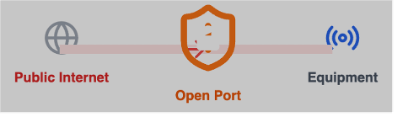
Even if you have a firewall, opening a port creates a direct tunnel for hackers.
Internet-wide scanning tools make it trivial to find such devices. Once discovered, attackers often need nothing more than a web browser and a quick search for factory default credentials to gain control. The result has been unauthorized audio being injected directly into the decoder and then broadcast on stations.
The key point here is not that engineers were careless. It is that the success criterion was functional audio, not long-term security.
And, once the link worked, it was rarely revisited.
PUSH VS. PULL: A CRITICAL ARCHITECTURAL DIFFERENCE
Many legacy codec implementations rely on a “push” model.
Audio packets are sent from the studio toward the transmitter site, which must be listening on a specific port. That listening port has to be reachable through the firewall, which usually means port forwarding.
Some codec systems, however, operate in a “pull” or subscription model. In this case, the decoder at the transmitter site initiates the connection and requests the audio stream from the source. From the firewall’s perspective, this looks like ordinary outbound traffic, similar to a web browser or streaming audio client.
This difference matters enormously.
With a pull-based architecture:
- No permanent inbound ports are required
- The transmitter site does not accept unsolicited traffic
- The firewall only allows return traffic from the source that was explicitly requested
In practical terms, this is inherently safer. The transmitter-side device is no longer apparent to the outside world, and there is no open door waiting for someone to push data through it.
Not all manufacturers support this model, and some implementations require a third-party coordination server (cloud-based or on-premises). But where it is available, pull-based audio transport dramatically reduces exposure without adding operational complexity.
THE EXPANSION OF THE ATTACK SURFACE
Unfortunately, the problem did not stop with codecs.
In recent years, attackers have demonstrated the ability to locate and access certain FM transmitters and RBDS (Radio Broadcast Data System) encoders that were exposed to the public Internet. The pattern is depressingly familiar:
- A transmitter or RBDS encoder includes a built-in web interface
- A port is opened on the router to allow remote access
- Default usernames and passwords are left in place
Once access is obtained, attackers have in some cases switched the transmitter to use its internal RBDS generator – even when an external encoder was in use – and injected offensive text that appeared on listeners’ radios. This is not something “possible.” It has happened at least a dozen times in the past six months alone, in the US and Europe.
To make matters worse, attackers often change the device password afterward, locking the station out and forcing a site visit in order to perform a local reset – and stop the offensive material. In cases where the engineer was not local, there have been cases where the offensive material ran over and over for at least 36 hours.
These incidents are especially damaging because RBDS content is public, immediate, and highly visible. Listeners often notice before engineers do.
WHY THE USUAL ADVICE MISSES THE MARK
After such incidents, the same advice is often repeated:
“They should have had a good firewall.”
“They should have used a VPN.”
The first statement is almost always wrong.
Virtually every broadcast facility already has a firewall. Any Internet-connected router sold in the last 25 to 30 years includes one. The problem is not the absence of a firewall – it is how that firewall is used.
Placing devices in a DMZ, forwarding ports broadly, or exposing management interfaces to the public Internet effectively bypasses the protection the firewall is meant to provide. Telling someone to “get a firewall” when they already have one does not address the real issue.
The VPN suggestion is more nuanced. VPNs can be an excellent solution—but only when they are the right kind and properly implemented.
WHAT DOES NOT WORK
Several commonly used “protective” measures provide little real security:
- Using obscure or non-standard port numbers
- Leaving factory default usernames and passwords in place
- Adding new users without removing default credentials
Changing a port number does not stop scanners.
Leaving default credentials is especially dangerous, because those credentials are almost always documented in manuals that are freely available online.
Once a device is reachable from the public Internet, default credentials are the first thing attackers try – and often the last thing they need.
PRACTICAL SOLUTIONS THAT ACTUALLY WORK
The good news is that none of this requires exotic technology or massive budgets to fix. Several practical, achievable approaches can dramatically improve security.
1. Site-to-Site VPNs (When Appropriate)
When communication is consistently between two known locations – such as a studio and a transmitter site – what is typically required for broadcast equipment is a properly designed site-to-site VPN, not a “road warrior” VPN used by a laptop.
A site-to-site VPN connects two fixed networks – such as a studio and a transmitter site – and allows devices on each side to communicate as if they were on the same LAN. In fact, a site-to-site VPN can eliminate the need for public port forwarding entirely.
This sort of system works best when:
- Traffic flows predictably between fixed endpoints
- Someone with real networking experience designs and maintains the VPN
But note: these VPNs can be very effective, but they are also:
- Configuration-sensitive
- Easy to misconfigure
- Dependent on proper key management and routing
VPNs are powerful tools, but they must be treated as infrastructure, not accessories. They often require expertise that many broadcast facilities simply do not have in-house.
When implemented poorly, they fail – or worse, provide a false sense of security.
2. Pull-Based Audio Transport
Where supported, pull-based codec architectures are one of the safest ways to move audio over IP.
PULLING AUDIO/DATA
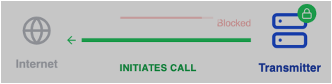
This is a much safer connection.
Broadcast equipment should initiate the connection to the studio. By having the transmitter-site device initiate the connection, the firewall remains closed to unsolicited inbound traffic. This mirrors the security model used successfully by consumer streaming for decades.
3. IP Address Whitelisting for Push-Based Traffic
When push-based transport is unavoidable – such as with certain audio codecs, RBDS generators, or MicroMPX systems – IP address whitelisting is an extremely effective and often overlooked solution.
If the studio has a static public IP address, the firewall at the transmitter site can be configured to accept traffic on a given port only from that specific IP address. Any packets arriving from anywhere else are dropped before they ever reach the device.
This approach:
- Is supported by most firewall routers
- Dramatically limits who can send data
- Works well even with push-based technologies
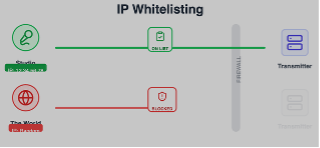
It can also accommodate redundancy by allowing a small list of approved source IPs.

4. Jump-Host Remote Access via a Local PC
For remote maintenance and troubleshooting, one of the safest and most practical approaches is to avoid exposing any broadcast equipment directly.
Instead:
- Install a small, reliable PC or Linux system at the transmitter site
- Keep it behind the firewall with no inbound ports forwarded
- Use a modern remote desktop service that initiates outbound connections
Remote access tools such as TeamViewer, AnyDesk, Splashtop, and others work without opening firewall ports. Engineers connect to the PC, and from there access transmitter and encoder interfaces locally.
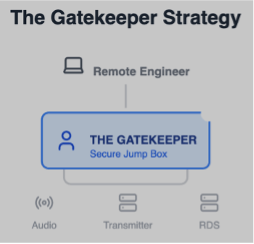
This “jump-host” model is inexpensive, easy to understand, and far safer than exposing embedded devices directly to the Internet.
THE REAL LESSON
The common thread in nearly all broadcast security incidents is not malicious intent or incompetence. It is architecture.
- Devices were exposed because it was convenient.
- Ports were opened because it worked.
- Defaults were left in place because the system was “done.”
Security improves dramatically when broadcasters:
- Stop exposing devices directly
- Constrain who is allowed to communicate
- Let firewalls do what they were designed to do
IT security for broadcast equipment does not require becoming an IT shop. It requires understanding a few key principles and applying them consistently.
The broadcast signal may be invisible, but the infrastructure behind it is not. Treat it accordingly – and it will stay on the air for the right reasons.
– – –
Kirk Harnak is well known for his work at the Telos Alliance and other companies. He also is owner of several radio stations. You can contact Kirk at: kharnack@gmail.com@gmail.com
– – –
Would you like to know when more articles like this are published? It will take only 30 seconds to
click here and add your name to our secure one-time-a-week Newsletter list.
Your address is never given out to anyone.