

A Free Tool to Comply with the New FCC EAS Password Rule – and More!

By Ken Fine
[July 2026] The FCC has issued the Public Notice and Order requiring EAS units to be held to a much tighter security standard than in the past (a discussion of the FCC actions is here). Ken Fine has utilized an A.I. structure to provide a simple password generator over which you have total control – and he offers it freely!
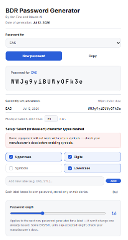
Here is the BDR Password Generator that I built for stations that do not have an IT department or a password manager budget. The downloadable QuickStart information sheet is here. Even better for some: A video demonstration is here!
NOTE: Registration is NOT mandatory. However, if you do register, it lets us know how many are trying/using the app and, more importantly, we can notify you if and when any upgrades happen – like the recent one where we dropped o and 0 so they cannot be confused. Registration is here. By the way, your comments are welcome!
WHY THIS MATTERS NOW
The FCC’s updated EAS security rule requires a strong password, at least 15 characters, with no dictionary words and no reuse across equipment or accounts.
That is a real burden for small and mid-size stations that do not have IT staff or a subscription password manager.
The BDR Password Generator is a free, no-account, no-server tool built specifically to close that gap.
The app generates genuinely random 8 to 32 character passwords instantly, right in your browser, with nothing to install and nothing to pay for.
HOW SIMPLE IT IS
All you have to do is open the app in any browser – Chrome, Firefox, Edge, or Safari.
There is no account to set up, no login sequence, not even an Internet connection required.
All you do is pick a label: “EAS,” “STL,” or whatever piece of equipment you are updating and a fresh, truly random password appears instantly. This is saved locally and pops back up any time you start the app.
Then hit “Copy” and “Paste” it into your equipment’s password field – and you are done! The button turns solid teal and reads “copied!” so there is no guessing whether it worked or not.
YES IT IS FREE
There is no catch.
The tool is a single html file that runs entirely inside your own browser. It does not need to connect to the Internet, it does not send your data anywhere, and it does not require a subscription.
Each password is generated using your browser’s built-in cryptographic randomness, the same kind of randomness used for secure web traffic, so nothing about it can be guessed or reproduced by anyone else who happens to have a copy of the app.
It is built to be handed out freely to any friend, colleague, or station that needs it.
Of course, if you like it, we invite you to sign up for the one-time-a-week BDR Newsletter.
ONE THING TO KEEP IN MIND
A strong random password only solves half the problem.
It still needs to be stored somewhere reasonably secure, a locked binder, a password manager, or something similar, rather than on a sticky note near the equipment it unlocks.
Using the copy function in the BDR Password Generator sends it to the clipboard, so you can paste it to a notepad or other place where you keep important information.
ABOUT CLAUDE AI
In case you are interested, this tool was built through a conversation with Claude, an AI assistant made by Anthropic.
Claude has a genuinely free plan, no credit card needed, that handles this kind of work well: writing and fixing code, researching FCC Rules and other technical questions, and building small tools or spreadsheets.
Free accounts do have usage limits that reset periodically, although paid plans do exist for people who need heavier daily use. However, the free tier is often enough for a lot of station-level projects like this one.
Anyone can try it at claude.ai on the web or through the Claude apps for iOS, Android, Mac, and Windows.
– – –
Questions about this write-up or the tool can be directed to Ken at fineken50@gmail.com. Ken is a retired broadcast engineer with five decades of experience in Texas and New Mexico.
– – –
Would you like to know when more articles like this are published? It will take only 30 seconds to
click here and add your name to our secure one-time-a-week Newsletter list.
Your address is never given out to anyone.