

Building A Secure Network For EAS

By Rolf Taylor
[August 2026] The FCC has become increasingly unnerved by the repeating hacking intrusions into normal program transmissions. Worried that this could affect delivery of information and instructions on the Emergency Alert System (EAS) during an emergency situation the FCC lit a short fuse in an effort to promote more secure networks at broadcast facilities around the country. Although, at this writing, the FCC has yet to issue policies to cover a number of questions, Rolf Taylor has undertaken to describe steps that can be taken by almost any station to reduce or prevent successful hacking.
Many stations, especially in smaller markets, do not have the staff with IT expertise to easily meet the FCC’s recent Order, setting out requirements for all broadcast stations with connections to the Internet.
The article is intended to provide some basic background targeted especially toward small stations without a fully-accredited IT staff. Note that the author is not a lawyer and, furthermore, the ideas shared here may or may not achieve compliance with the FCC’s ruling.
However, this article is meant to broaden the discussion and act as an idea starter.
WHY, WHAT, HOW?
The Commission’s primary goal was to harden the EAS, so it would be reliable when needed – and secure from the possibility of false alerts.
Allied with this, including a Notice of Proposed Rulemaking, were requirements to increase the level of security at stations so as to reduce the incidents of hacking where bad actors take over part or all of the program chain and broadcast unwanted material.
Basically, the FCC is requiring three things: (1) any equipment in the program chain that has any connection to the Internet should utilize passwords of at least 15 characters – using no words, (2) place all such equipment behind a secure firewall, and (3) maintain any and all updates promptly.
BASIC BACKGROUND
First off, I recommend that you review the following articles on the BDR as this article builds on what is covered there.
- https://www.thebdr.net/the-fcc-cybersecurity-order-nprm/
- https://www.thebdr.net/it-security-for-broadcast-equipment/
In addition, here is a FREE tool to generate passwords that are compliant.
Now, here is some more on how to implement the FCC’s new security standards.
FIRST THINGS FIRST
The easy part of compliance is the password requirement.
I would suggest moving immediately to first upgrade (if necessary) your EAS equipment to the most recent firmware.
Then move on to changing the necessary passwords on it – and other critical equipment such as codecs, RDS encoders, and transmitters. While the current versions of EAS device firmware should be able to support FCC-complaint passwords, it is possible some other gear might not allow using the necessary password length and other requirements. It is best to determine that as soon as possible so you can reach out to the manufacturer to determine how to upgrade to suitable versions.
Since this article is targeted to small broadcasters with simple air chains that include the public Internet, we will not cover HD equipment. I also will assume that the playout server is using analog or AES to connect to the codec and that the playout server is outputting Program Associated Data (PAD) using some sort of serial connection (not IP). As an example, of what you likely have, here is a sample air chain configured the “old way”:
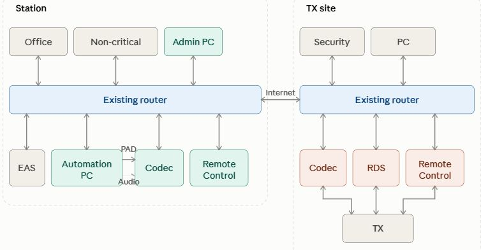
Diagram 1 – The old way of connecting things.
In the typical diagram shown above, things were configured before the risks were known and everything may have been working just fine for a decade or more. It is how most of us did things 15 years ago and, again, this article is targeted to smaller stations.
Basically, it is a simple plug and play network, and was very easy to set up. It does do its job, but this is what hackers hope for.
The risks are as follows:
- the endec, RDS, and codec are probably using port-forwarding through the existing router’s
firewall. That leaves holes into your network from the Internet, one for each port forwarded.
In such cases, strong passwords are the only protection against attack.
- in addition to vulnerability directly from the Internet, this topology also means that every
computer on the office LAN has access to these devices, since they are all on the same LAN.
- unqualified individuals could meddle; but worse yet it means that if one of those office
computers were to be hacked the hacker has access to every device on the network.
So, what has to be done to get up to compliance?
BUILDING A SECURE SITE
Fortunately, the key steps are not going to be really a problem for most stations. Let us then assume that you have now moved to compliant 15-character passwords and upgraded your devices.
Next, we present the quick and dirty way to most likely meet FCC compliance. Note that it does not address possible vulnerabilities of the non-critical equipment, something that should be revisited once you have covered the FCC requirements (essentially, their ruling appears intended to prevent the hijacking of your air chain and protecting EAS equipment – as far as the author can tell, the FCC really does not care as much about vulnerabilities to your business operations).
So given that assumption, and the need to “git’r done” quickly, we are presenting the Keep It Simple Stupid approach that the author believes achieves compliance quickly and easily.
KEEPING IT SIMPLE
Your existing routers at studio and transmitter sites can be left in place. Then, a pair of new routers that can support a VPN (Virtual Private Network) connection between them are connected behind the existing routers.
Our recommended additional VPN path is not very new or unusual. Typically, most medium-sized companies and all large companies now have VPN servers for employees to be able to securely access the company network when on the road or working from home. The VPN is analogous to a tunnel while it passes through the Internet, only specifically configured VPN devices can access the private network.
As noted, one of the new routers will be a configured as a server and one will be configured as a client. (A VPN server itself can support multiple client connections.) This thereby creates a completely private connection between the two routers. Only the FCC-critical equipment is then connected to the new routers.
DHCP AND CGNAT
An Internet service will normally support either a fixed IP address or a Dynamic Host Configuration Protocol (DHCP) address.
A fixed IP address is static (fixed), whereas a dynamic IP address can change. A well-known workaround for the DHCP problem is something called Dynamic DNS hostname or DDNS service. Our sample router supports this so it only adds a bit more configuration.
Unfortunately, if your Internet Service Provider (ISP) uses something called CGNAT (Carrier Grade Network Translation it will be more complex to host a VPN server. So, I recommend you check on this for both your studio and transmitter sites.
As long as one site is not using CGNAT you are good to go; that site will host the server. On the other hand, the site with CGNAT will need to be the client VPN device.

CONNECTING THE EQUIPMENT
Only the FCC-critical equipment is re-connected to the new routers.
These new routers are configured to not allow inbound connections from the Internet (e.g. from the Ethernet connection via its WAN port to the original router). The routers I suggest for this use are configured this way by default. They have 3 LAN-side Ethernet ports that connect to our critical gear (if more than 3 connections are needed a small switch can extend that number).
Administration access can then be done using the existing routers with WiFi configured for necessary security, and using an FCC-complaint password.
For maintenance and configuration of the equipment there are two options:
- The new routers that support WiFi so a suitable secure WiFi network can be created along with an FCC complaint password on either or both routers.
- Computers on the Internet can access the VPN server over the Internet directly, and once connected would have access to all equipment on the VPN (which is the ideal we all strive for in this modern world).
All-in-all, it looks a little different but, really, not so much.
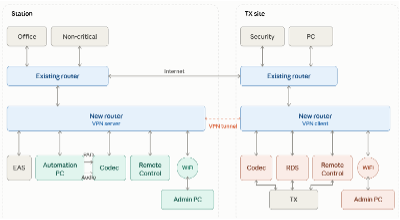
Diagram 2 – a KISS Upgrade
IS THIS ENOUGH?
The upside of doing things this way – it is the quickest and simplest approach to reach FCC requirements.
Cost will be under $300 for the routers, and about an hour at each site to set it all up.
On the other hand, yes, there are downsides:
- This will do nothing at all to protect any other PC’s present at the site.
- Daisy-chained router arrangements are subject to losses of speed and increased latency.
- Since you are replacing the Internet access for key equipment, your STL will be down as you make the upgrade. That can be minimized be installing the two routers first, configuring the VPN server and client and verifying all is working before cutover.
Additional Note:
- VPN speed is not as fast as more expensive solutions, but should be adequate.
- As noted, the Internet service need not have a fixed IP address.
- However, if CGNAT is in use by your ISP, you may need to call for help.
MORE TO SHARE ON VLANS
Shortly, there will be a second article, which I have entitled “VLANs For Dummies” and plan to discuss and describe how to implement a VLAN.
Like many of you, I am not a dummy, but neither do I relish the idea of diving into routing tables and other security aspects. That is why found some fairly inexpensive products that will do what is needed without requiring a lot of extra work.
As we say on the radio, “Please Stay Tuned!”
– – –
Rolf Taylor is an experience broadcaster who works at many stations across the country. You can contact Rolf at rolf.taylor@yahoo.com
– – –
Would you like to know when more articles like this are published? It will take only 30 seconds to
click here and add your name to our secure one-time-a-week Newsletter list.
Your address is never given out to anyone.