

Do You Have the Right USB-C Cable?
By Barry Mishkind
[August 2026] One thing about standards – they keep changing. This is true across many areas of use. FCC Rules have changed a lot in the past months. But the electronics industry is always changing. For one thing, you likely have at least one adapter cable to deal with the various USB configurations. Here is a tip that might be helpful for solving a problem.
A couple of years ago, I got a 1 TB flash drive, and started putting files on it.
A week or so later, I suddenly found that when I tried to update the drive, I could not see any data at all. I was really mystified and worried I had lost the files. I even opened the container and looked inside to see if there was anything that stood out. The one thing I could tell, the little LED was on, so power was getting to the drive.
So, why could I not get my data from the drive, or access it to add files?
THE USB-C
The solution actually appeared by chance – and now that I know, it will not fool me again.
It turns out that the problem was a “standard.” USB-C, the small, mostly oval connector, comes in several flavors. Some of them pass data and power, while others just pass the power. And, here is the key: not all cables will clearly identify which one they are.
Yes, the connector was standardized, but the cable and its capabilities are not.
At the NAB Spring Show, I met with a few folks from Monoprice. A little more digging and they verified that not all USB cables are created equally. One USB-C cable might fast-charge a laptop but not drive an external monitor. Another may handle video output but top out at 100W charging. Others advertise impressive specifications without any independent verification that they actually meet them.
USB4
Monoprice’s version, their USB4, does come in a couple of flavors, all doing data and charging, but they are certified and labelled with details as to performance and features on their product pages.
For example, the 40 Gbps USB-IF model is the “flagship” model, produced for the fastest data transfer speeds.
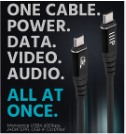
One might consider the 40 Gbps and wonder if it is needed right now. Monoprice replies: “it might not be needed today, but the cable is built to handle the future needs for audio and video, as well as charging of gear.”
A slightly different look is shown in their 20 Gbps Right-Angle version – for those places where clean cable routing is the most important.
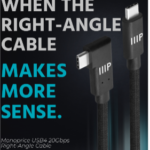
While not exactly turtle speed by any means, the Right-Angle version of the USB4 cable allows you to route the cable behind and alongside equipment in a neater, less “cluttery” way or easily connect to an external SSD.
By the way, the designers seem to anticipate the needs of users in the field. For instance, if you need a short cable to carry for charging or to connect two rack-mounted items, a 1-foot cable is available. And if you do not want/need a black cable, some of the USB4 can also be gotten in white or blue!

CABLES THAT WORK
The promise of USB-C has been out there for years. Different manufacturers have built a number of variations, some more rugged than others, some with higher bandwidth than others, some only handling charging – and even then, not always at a high rate.
Monoprice offers a wide range of products that are reliable and modestly priced. Just as importantly, the USB4 cable remains backward compatible with existing USB-C ecosystems, including Thunderbolt 3, Thunderbolt 4, USB 3.2, and USB4 hosts operating at lower speeds.
And you will not have to wonder where your data went!
– – –
Would you like to know when more articles like this are published? It will take only 30 seconds to
click here and add your name to our secure one-time-a-week Newsletter list.
Your address is never given out to anyone.